
System Integrations
OIC-based integrations across cloud and on-premises systems.
Oracle Integration Cloud (OIC) is the standalone middleware platform (PaaS) used to orchestrate connections between Oracle Fusion SaaS and external systems. Since you cannot directly access or modify Oracle Fusion’s backend database, OIC 3 serves as the secure translator and traffic controller.
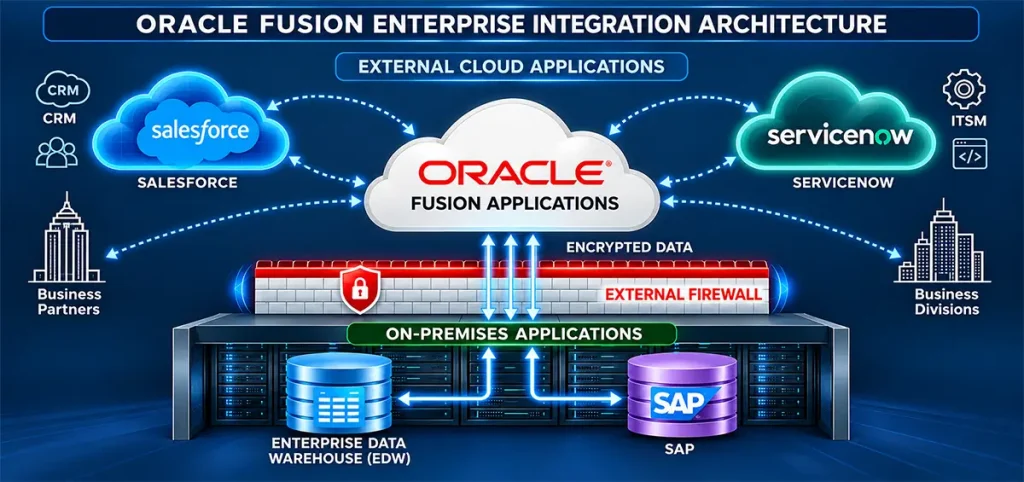
The OIC 3 Functional Component Architecture
OIC 3 is not just a data-mapper; it is an all-in-one automation suite built around four distinct cloud capabilities:
App Integration
The core visual interface used to create triggers, map data fields, and invoke target endpoints.
Process Automation
A workflow engine built to handle "Human-in-the-Loop" (HITL) scenarios, such as multi-tiered, complex business approvals before data enters the ERP.
Robotic Process Automation (RPA)
Software bots that automate manual, repetitive steps on legacy external systems that completely lack APIs.
Integration Insights
A real-time executive dashboard that extracts business metrics (e.g., tracking total revenue processed across pipelines) without changing integration code.
Key Structural Features of OIC 3
Modern architectures rely on native tools that simplify enterprise deployments:
The Project Workspace
A logical container that groups related connections, lookups, and pipelines. This isolation lets you manage version control, secure user access, and bundle objects together for deployment
Prebuilt Native Adapters
OIC features a library of native connectors (like the Oracle ERP Cloud Adapter, Salesforce Adapter, and SAP Adapter). These abstract technical complexities, eliminating the need to write manual REST or SOAP payload scripts from scratch
AI Agent Studio
Allows organizations to safely hook Generative AI models and LLM agents directly into enterprise integration flows.
The End-to-End OIC Development Process
Building and running an active interface inside OIC 3 follows a structured lifecycle:
- Create Connections
- Design Pipeline
- Data Mapping
- Activate & Monitor
Establish Connections (Trigger & Invoke)
Developers start by defining the boundaries of the data flow inside the OIC project room:
- Trigger (Source): Configures how OIC receives data (e.g., an external CRM system pushing a webhook request).
- Invoke (Target): Configures how OIC submits data (e.g., pushing that information securely into Oracle Fusion SaaS via its API host details).
Build the Orchestration Flow
Using a drag-and-drop designer canvas, developers define the logical flow. You can introduce routing switches (If/Else branches), loop iterations for batch lines, or parallel routing branches to hit multiple target endpoints at once.
Visual Data Mapping
Because the source and target applications write data differently, the developer opens the visual transformer. You map fields on the left (e.g., Cust_ID) to fields on the right (e.g., PartyNumber in Fusion ERP). OIC includes ML-powered recommendations that predict common field matchings automatically
Activation & Live Tracking
The completed project is activated with a single click. Once live, administrators use the OIC Monitoring Dashboard to track live metrics. If a payload fails, a visual tracker called Activity Stream details exactly which step errored out, allowing for rapid debugging.
Oracle technology we deliver this on
The same team covers cloud and on-premises products, so one engagement can span several of them.
Oracle Fusion Cloud ERP
Finance, procurement, projects and risk in one cloud suite.
Oracle Fusion Cloud HCM
Hire-to-retire HR, payroll and talent on one platform.
Oracle Fusion Cloud EPM
Connected planning, budgeting, close and reporting.
Oracle E-Business Suite R12
Implementation, upgrades and support for on-premises EBS.
Oracle NetSuite Cloud ERP
Cloud-native ERP for growing and mid-size businesses.
Oracle Analytics Cloud [OAC]
Dashboards, self-service BI and augmented analytics.
Talk to us about System Integrations
Share where you are today and what you want to achieve. A senior consultant reviews every enquiry.
- A reply from a consultant, not a call centre
- Clear next steps and effort estimate
- No obligation
Prefer to talk?
Call or message us directly. A consultant will pick it up.
Chat on WhatsApp+91 81211 00987wisemastererpconsulting@gmail.comSend us your requirement
Your enquiry reaches our team on WhatsApp and by e-mail.
Enquiry saved. One step left.
WhatsApp should have opened with your details. Press send there so we get your message straight away. If it did not open, use the button below.
Open WhatsApp