
Oracle Integration Cloud [OIC]
Connect Oracle, SaaS and legacy systems.
Oracle Integration Cloud (OIC) is a cloud-based Integration Platform as a Service (iPaaS) designed to seamlessly link disparate applications. It acts as an enterprise middleware layer that connects cloud-to-cloud SaaS (like Oracle Fusion, Salesforce, and Workday) as well as legacy on-premises applications
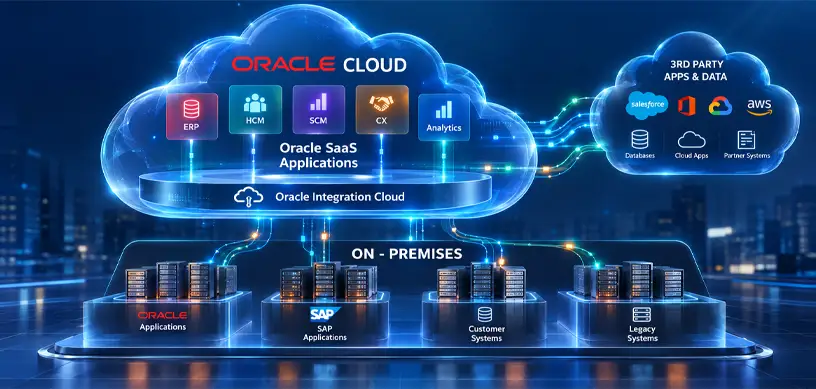
The Three Core Pillars of OIC
OIC unifies three distinct software engines under a single low-code platform:
Application Integration
Connects APIs, maps schemas, and handles data transfers between target applications.
Process Automation
Manages human-in-the-loop workflows, complex multi-stage approvals, and business exception routing.
Visual Builder (VBCS)
A drag-and-drop tool to rapidly build custom web and mobile interfaces that sit on top of your integrated applications.
Understanding the Lifecycle of an OIC "Process"
When you talk about an OIC “Process,” it usually refers to Oracle Process Automation (OPA). OPA is used for human-centric business logic—such as HR leave approvals, procurement spending validations, or customer on boarding.
The lifecycle of an automated enterprise process flows sequentially through these stages:
Design Stage (The Application)
Developers design the lifecycle inside the Application area of the OPA platform.
- BPMN Flowcharts: Workflows are modeled visually using standard BPMN notation (Start Events, Gateways, Human Tasks, End Events).
- Low-Code Forms: You build the UI web forms (e.g., text boxes for fields like “Invoice Total” or “Requested Time Off”) directly in OIC to collect human input.
- Role/Persona Creation: Permissions are established within the workflow (e.g., separating the “Submitting Employee” from the “Approving Manager”).
Integration Binding (The Hook)
Once the human process workflow is built, it must talk to your underlying transactional databases or apps.
- Connectors & Adapters: Using OIC’s catalog of 50+ prebuilt adapters, the process connects to live endpoints (such as firing a request into an Oracle Fusion ERP instance).
- Data Mapping: An ML-powered Visual Data Mapper translates fields between different environments without manual code mapping.
Runtime Execution (The Workspace)
Once activated, the application moves into the Workspace phase for end users.
- When a trigger fires (e.g., a customer submits an on boarding form), an active process instance is created.
- If a manager’s approval is needed, the process creates a task in their inbox, sends a notification, and pauses until a choice is selected.
- SLA Triggers: If an approval takes too long, the system automatically escalates, re-routes, or sends follow-up alerts based on built-in timeout criteria.
Intelligent Optimization & Gen3 Advancements
In modern deployments (OIC Gen 3), the engine tracks end-to-end performance using real-time data streaming analytics.
- Embedded AI Assistants: Generates automated integration pipelines using conversational natural language text.
- Robotic Process Automation (RPA): If an external target legacy app lacks a modern API, OIC uses software robots to record, replay, and automate human data-entry tasks natively
What we can do for you
Whether you are evaluating, implementing or already live, there is a clear starting point.
ERP Assessment [Go/No-Go]
A structured readiness review before you commit budget.
Fusion Cloud Implementations
End-to-end Oracle Fusion rollouts, from design to go-live.
Managed Services
24/7 support, monitoring and optimisation after go-live.
Upgrades and Customizations
Quarterly updates, extensions and Redwood pages, done safely.
System Integrations
OIC-based integrations across cloud and on-premises systems.
On-Premise2Cloud Migrations
Move workloads and data to the cloud in planned stages.
Talk to us about Oracle Integration Cloud
Share where you are today and what you want to achieve. A senior consultant reviews every enquiry.
- A reply from a consultant, not a call centre
- Clear next steps and effort estimate
- No obligation
Prefer to talk?
Call or message us directly. A consultant will pick it up.
Chat on WhatsApp+91 81211 00987wisemastererpconsulting@gmail.comSend us your requirement
Your enquiry reaches our team on WhatsApp and by e-mail.
Enquiry saved. One step left.
WhatsApp should have opened with your details. Press send there so we get your message straight away. If it did not open, use the button below.
Open WhatsApp