
AI Agents Studio [Agentic Apps]
Build and deploy AI agents inside Fusion applications.
Oracle AI Agent Studio is a built-in, low-code design-time workspace integrated within the Oracle Fusion Cloud Applications Suite that allows IT administrators and developers to create, configure, validate, and deploy AI agents and multi-agent workflows tailored to specific enterprise processes. It allows organizations to customize pre-built Oracle templates (for Human Capital Management (HCM), Supply Chain Management (SCM), Procurement, Finance, etc.) or build autonomous AI assistants from scratch that natively read, reason, and act upon live enterprise data
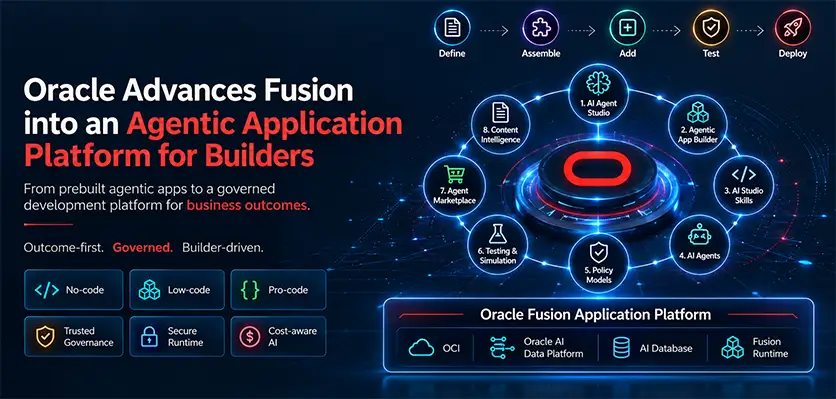
Oracle’s Agentic Application Builder is a low-code workspace embedded inside Oracle AI Agent Studio. It allows developers and business users to create Fusion
Agentic Applications—dynamic, reasoning apps driven by teams of specialized AI agents that execute complex, multi-step enterprise workflows using natural language instructions
Understanding the Core Components
To build these applications, the framework divides responsibilities between two distinct areas:
AI Agent Studio
AI Agents (Defined in AI Agent Studio): Autonomous AI entities given a specific persona, a large language model (LLM), structured prompts, and a set of “tools” (such as Fusion REST APIs, databases, or third-party connections). They do not just answer questions; they can plan, self-correct, and take actual actions. The environment relies on several modular building blocks to define how an agent behaves and interacts:
Agents & Teams
Individual autonomous workers or grouped teams assigned to coordinate multi-step workflows.
Instructions & Prompts
Natural-language rules that govern the persona, guardrails, and scope of the agent's reasoning.
Topics & Tools
Functional plugins (like REST APIs, deep links, mathematical modules, or custom filters) that give the agent its capability to perform actions or call business objects.
Knowledge Stores
Semantic data tools allowing admins to upload documents (such as company policies or repair logs) for the agent to access via vector searches.
The AI Agent Creation & Deployment Process
The end-to-end lifecycle within the Oracle AI Agent Studio follows a structured implementation sequence:
Security & Pre-Configuration Setup
Before accessing the workspace, administrators must activate internal infrastructure controls:
- Set the Security Console External Application Integration (ORA_ASE_SAS_INTEGRATION_ENABLED) profile option to Yes.
- Set product-specific profile values enabling generative AI components.
- Assign security roles like the Fusion AI Agent HCM Administrator Duty or SCM equivalents.
- Run foundational enterprise security synchronization jobs (Import Resource Application Security Data and Import User and Role Application Security Data).
Selecting a Blueprint
- Open the studio interface from the Fusion navigator menu under Tools > AI Agent Studio.
- Browse the catalog of pre-configured templates organized by functional area (such as HCM Benefits Policy Advisors or SCM Equipment Repair Analysts).
- Deploy an out-of-the-box template directly or duplicate it to create a custom blueprint branch.
Defining Instructions & Guardrails
- Input natural-language prompts to restrict the agent’s focus.
- Establish the boundaries of conversation to prevent hallucinations.
- Configure the maximum sequence interactions allowed per query session.
- Map specific Large Language Models (LLMs) to use for execution.
Attaching Enterprise Data & Actions
- Connect the agent to internal data fields or secure external data source systems.
- Load reference documentation into the semantic search module.
- Link functional tools that empower the agent to process specific transactions, update record fields, or trigger notifications via system alerts.
Verification & Testing
- Open the Design-Time Testing Panel inside the studio workspace.
- Input starter or mock test questions to observe step-by-step reasoning maps.
- Analyze tracing logs via Debug Mode to see JSON inputs, tool calls, and data extractions.
- Refine response accuracy by tuning prompts without altering underlying application code.
Roles Mapping & Deployment
- Navigate to the Security tab within the configured agent.
- Provision employee or customer security privileges to authorize standard runtime execution.
- Publish the agent to push it live into active business application pages or communication channels (such as Microsoft Teams or Slack).
Agentic App Builder
Agentic App Builder (The Canvas): The UI layout platform where you arrange those agents onto a page, choose layout patterns, and connect their outputs together to serve a shared business objective.
The Agentic App Building Process
The creation of an enterprise agentic application flows through a conversational, iterative lifecycle:
- Describe Intent
- Agent Orchestration
- Layout & Context
- Validation
- Secure Publish
Describing the Objective (Natural Language Entry)
Instead of drafting code or dragging hard-coded workflow nodes, the process begins in the App Builder interface with a search bar.
- The user describes the business objective in plain language (e.g., “Create a command center for executives to track major operational changes and workforce readiness”).
Agent Composition and Orchestration
The Agentic App Builder analyzes the text prompt and scans the organization’s available catalog in AI Agent Studio.
- It automatically recommends a team of specialized sub-agents (e.g., an HR Agent to review talent gaps, a Supply Chain Agent to evaluate delivery metrics, and a Finance Agent to verify budgets).
- If an agent requires deeper logic, the user is directed to the Studio to update its underlying system prompt layer.
Shaping the Layout and Experience
Once the agents are selected, the developer edits the app’s visual structure.
- They select structural patterns (like dual-column interfaces or analytical charts) and assign specific agents to populate those zones.
- Prompt Layering: While the base agent contains general rules, the App Builder allows the user to inject app-specific instructions directly on the page template.
Verification and Model Analysis
Before deployment, the builder provides sandboxed testing utilities.
- Developers preview how the multi-agent system collaborates.
- The system generates test data to ensure the models aren’t failing or hallucinating and analyses runtime metrics—including the cost-effectiveness of the LLM execution.
Publishing to the Enterprise (The Guardrails)
With a single click, the application is deployed directly into the Fusion Cloud environment.
- Identity Propagation: The published app strictly inherits Fusion Cloud’s role-based access controls. An AI agent executing a process will never see or modify data that the logged-in human user doesn’t have permission to access.
- Tool Communication: Under the hood, agents rely on Model Context Protocol (MCP) or Oracle Integration Cloud (OIC) to cleanly communicate with legacy systems and non-Oracle endpoints securely.
What we can do for you
Whether you are evaluating, implementing or already live, there is a clear starting point.
ERP Assessment [Go/No-Go]
A structured readiness review before you commit budget.
Fusion Cloud Implementations
End-to-end Oracle Fusion rollouts, from design to go-live.
Managed Services
24/7 support, monitoring and optimisation after go-live.
Upgrades and Customizations
Quarterly updates, extensions and Redwood pages, done safely.
System Integrations
OIC-based integrations across cloud and on-premises systems.
On-Premise2Cloud Migrations
Move workloads and data to the cloud in planned stages.
Talk to us about AI Agents Studio
Share where you are today and what you want to achieve. A senior consultant reviews every enquiry.
- A reply from a consultant, not a call centre
- Clear next steps and effort estimate
- No obligation
Prefer to talk?
Call or message us directly. A consultant will pick it up.
Chat on WhatsApp+91 81211 00987wisemastererpconsulting@gmail.comSend us your requirement
Your enquiry reaches our team on WhatsApp and by e-mail.
Enquiry saved. One step left.
WhatsApp should have opened with your details. Press send there so we get your message straight away. If it did not open, use the button below.
Open WhatsApp